
Online Text Case Converter | Convert Uppercase & Lowercase
Convert your text to uppercase, lowercase, sentence case, title case, capitalized case, and more.
Many people don’t pay attention to text formatting while writing emails, titles, articles, assignments, or web content. As a result, the text may appear in the wrong letter case, and manually fixing it can be time-consuming, especially for large amounts of content.
Our free online Case Converter tool helps you quickly convert text into different formats with a single click. You can easily change text to uppercase, lowercase, title case, sentence case, capitalized case, inverse case, and other writing styles instantly. This fast and user-friendly text case converter saves time, improves formatting accuracy, and makes your content easier to read.
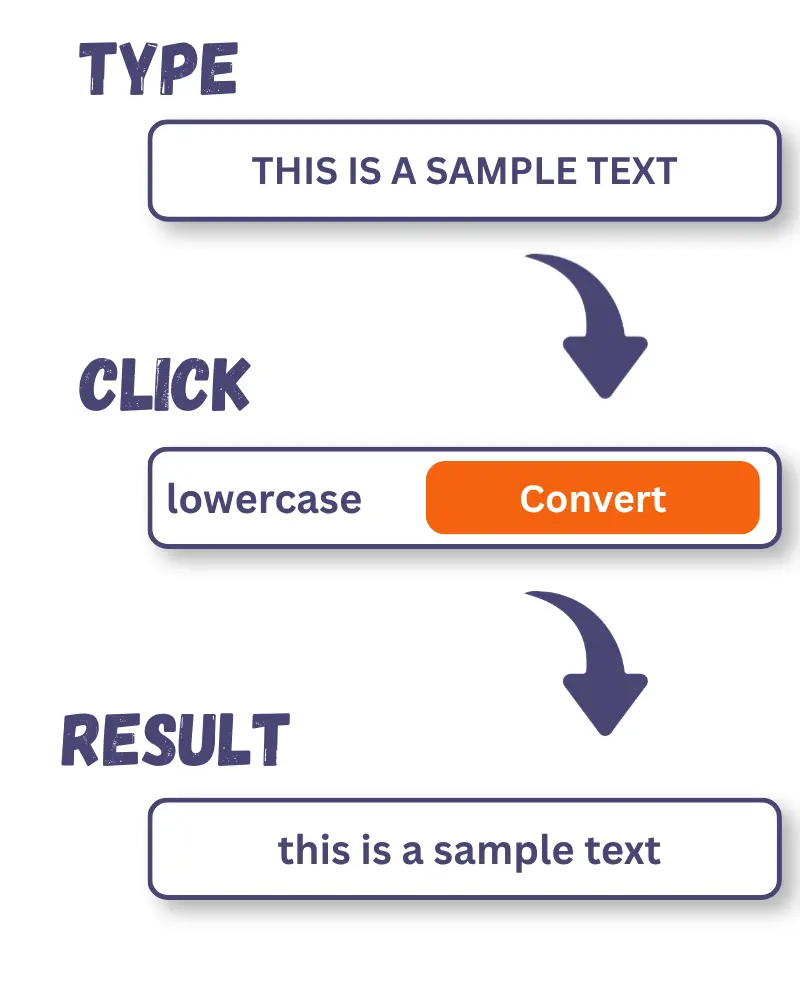
How to Use the Case Converter tool
This online tool can be used to convert text to your required format. The following are simple steps to change your text format.
What Does This Online Case Converter Do?
This online Case Converter is a simple and fast tool that helps you convert text into your desired letter case instantly. With just one click, you can change text to uppercase, lowercase, title case, sentence case, capitalized case, inverse case, and other formatting styles within seconds.
The tool can easily handle large amounts of text and mixed capitalization without affecting your original content. It is useful for content writers, students, developers, SEO professionals, office workers, and anyone who regularly works with text formatting.
To better understand how a online text case converter works, it is important to first understand the difference between uppercase and lowercase letters.
What is Uppercase?
Uppercase letters, also known as capital letters, are the larger version of letters in the alphabet compared to their lowercase counterparts and are normally used at the start of sentences, titles, proper nouns, or to emphasize something.
Examples of Lowercase Letters: A B C D E F
What is Lowercase?
Lowercase letters are smaller and non-capitalized versions of uppercase letters. Most of the words we read and write every day are lowercase, except some cases like the beginning of a sentence.
Examples of Lowercase Letters: a b c d e f
Why do people need Case Conversion tools
In today’s digital environment, people work with large amounts of text across multiple platforms, tools, and formats. While writing, editing, or copying content, text capitalization often becomes inconsistent, which can create formatting issues, reduce readability, and increase editing time.
An online Case Converter helps users quickly fix these problems and maintain consistent text formatting with minimal effort.
Below are additional reasons people need an online case converter.
Text Conversion Options Available in Our Tool
This converter provides multiple case conversion options so you can transform text as required.
Sentence Case Converter
This converter will help you to convert your text into sentence case. It capitalizes the first letter of every sentence while keeping the rest of the text in lowercase. It also capitalizes the pronoun “I”. This makes your content clean, professional, and easy to read.
Example:
Input: the sun is shining today. birds are flying in the sky.
Output: The sun is shining today. Birds are flying in the sky.
Uppercase Converter
it allows you to transform your text into ALL Caps format. It converts every letter of the provided text into uppercase format. This format is commonly used for headings, titles, advertisements, newspaper headlines, abbreviations, and important notices.
Example:
Input: i enjoy reading books.
Output: I ENJOY READING BOOKS.
Lowercase Converter
It allows you to convert your text to lowercase. This utility changes every letter in the provided text into lowercase format. Lowercase letters are commonly used in sentence body text, everyday writing, and informal communication.
Example:
Input: THE MEETING STARTS AT NOON.
Output: the meeting starts at noon.
Inverse Case Converter
This converter flips the case of all letters provided to it. It converts uppercase to lowercase and vice versa. It can be used to fix “Caps Lock” blunders, correct formatting issues, or create stylistic text effects.
Example:
Input: We visited the park. Children were playiny.
Output: wE VISITED THE PARK. cHILDREN WERE PLAYING.
Title Case Converter
It capitalizes the first letter of major words in a sentence while keeping the minor words in lowercase. The primary goal of this converter is to highlight important words (nouns, pronouns, verbs, adjectives, and adverbs) while keeping the functional words (like articles and prepositions) in the background. This creates a visually appealing text and helps the reader focus on the core subject.
Example:
Input: children played in the park this evening.
Output: Children Played in the Park This Evening.
Capital Case Converter
Capital Case is often referred to as Star Case or Proper Case. This tool ignores the grammar of text and treats every word equally by transforming the first letter of each word into uppercase, regardless of its importance or length. It is a more mechanical way of formatting text for titles, headings, and labels.
Example
Input: children played in the park this evening.
Output: Children Played In The Park This Evening.
Alternate Case Converter
This converter transforms the case of each letter of the provided text into an alternative pattern. Letter case switches between lowercase and uppercase letters without considering grammar rules. This style of text is often used for sarcasm, gaming usernames, creative text formatting, or playful messages.
Example:
Input: she completed her homework early.
Output: sHe CoMpLeTeD hEr HoMeWoRk EaRlY.
Random Case Converter
This converter changes the text into a mix of uppercase and lowercase letters. It produces unpredictable results based on probability. These changes do not apply to punctuation marks, numbers, or special characters, since they do not have a concept of letter case. This case style is commonly used in gaming, simulations, education, cybersecurity testing, and marketing promotion.
Example:
Input: technology changes very fast.
Output: TecHnoLOGy ChANGeS vERy fAst.
Who Can Benefit from this online tool
This online converter is useful for different types of users, especially those who work with text daily. Here’s who can benefit the most:
Students
The students need the converter to remove formatting mistakes and improve the readability of their academic writings.
Content Writers & Bloggers
This online utility is a great help for content writers and bloggers. They need properly formatted content. It helps user to
Programmers & Developers
Our online tool helps programmers handle coding standards and naming conventions.
Data Entry Operators
Data Entry Operators’ work involves handling large amounts of text where formatting consistency is important. They can
Digital Marketers & SEO Experts
Proper formatting affects the readability of content, which impacts ranking. This online utility helps professionals to meet search engine guidelines.